Exit code 127: what command not found really means in a container
Exit code 127 means command not found; 126 means found but not executable. Both are shell verdicts on your entrypoint. Where containers hit them, verified live.
kubernetesdockertroubleshootingtechnical
Exit code 127 means command not found: the shell that was supposed to launch your process went looking for the executable and came up empty, so your code never ran at all. Its sibling, exit code 126, is the other half of the same verdict: the file was found, but it could not be executed. When a shell delivers either number while trying to launch your application, your application's logs have nothing to say about it.
In a container, these two codes almost always mean one specific thing: what the container was told to run and what its filesystem actually holds disagree. The manifest says run this; the image says there is no such thing here, or not in a runnable state. A typo, a path that exists in your dev image but not the production one, a script that lost its execute bit somewhere between repository and volume mount.
The internet's standard advice is "check for a typo and check your PATH", which is true and insufficient. The interesting failures are the ones where the file is demonstrably right there and the shell still says not found. And whether you even get a 127 depends on who launches your process, a distinction most write-ups blur and the one this post is built around. Every exit code and error string below was reproduced live before we quoted it, on k3s v1.34.6+k3s1 (containerd 2.2.2, runc 1.4.1).
What does exit code 127 actually mean?
Shells conventionally use 126 and 127 for their own execution verdicts rather than reserving them by law (the last section comes back to this). When you ask one to run something, 127 means it could not find the command; 126 means it found the file but the operating system refused to execute it. When shells report a death by signal, they commonly use the 128-plus-signal convention: 137 is SIGKILL, 143 is SIGTERM. Those describe how a running process died. 127 and 126 describe a process that never lived.
That non-existence is the diagnostic core. There is no stack trace, no startup log, no partial output, because there was never a process to produce them. The only witnesses are the shell's one-line complaint and the record Kubernetes keeps of the corpse.
Who actually launches your entrypoint?
Here is the distinction that decides which failure you get. A container's process is defined by the image's ENTRYPOINT and CMD, and a Kubernetes manifest can override them: command: replaces ENTRYPOINT, args: replaces CMD. Whatever the combination resolves to, it launches one of two ways. In exec form, the container runtime executes the binary directly, no shell anywhere. In shell form (or any explicit sh -c in your command:), a shell starts first and launches your process for you.
Only the second path can turn this miss into a 127 or a 126, because only the second path has a shell in it to deliver the verdict. We ran both against the same missing command. The shell version:
command: ['sh', '-c', 'nosuchbinary']
logs sh: nosuchbinary: not found and leaves this record:
{ "exitCode": 127, "reason": "Error", "startedAt": "...", "finishedAt": "..." }
The exec-form version, command: ['nosuchbinary'], fails before any process exists. The runtime cannot even create the container, and on our containerd setup the record looks completely different: reason: StartError, exitCode: 128, and a startedAt of 1970-01-01T00:00:00Z, the epoch-zero timestamp of a container that never started. The actual explanation lands in kubectl describe as a warning event: exec: "nosuchbinary": executable file not found in $PATH, at the end of a long OCI runtime create failed chain. Same typo, and the evidence is in a different place with a different code, which is worth knowing before you go hunting for logs that were never written.
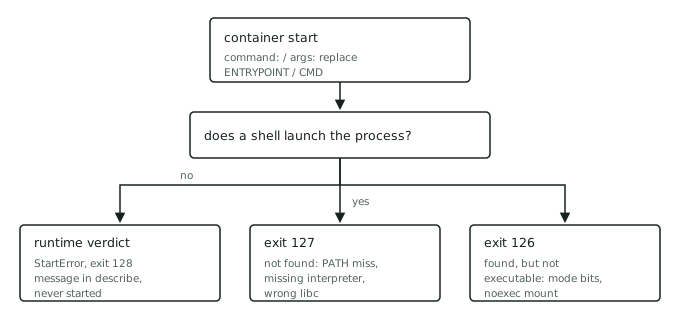
One special case of the left branch: distroless images have no shell at all. Put sh -c in a manifest over a distroless image and the executable the runtime cannot find is sh itself.
Why does the shell say not found when the file exists?
The honest 127 is a typo or a wrong path, and you will find it in a minute. The dishonest ones are the reason this post exists. "Not found" does not mean your file is missing; it means the kernel returned no-such-file for the exec, and there are three famous ways that happens to a file you can see with ls.
The interpreter is missing. A script's shebang line names the program that runs it. #!/bin/bash on an Alpine or BusyBox image, where only /bin/sh exists, means the exec fails on the interpreter, not the script. The shell then blames the script: we reproduced this and the log says sh: /tmp/run.sh: not found, exit 127, about a file that is present and executable. Windows line endings cause the same shape one level down: a CRLF-saved script asks the kernel for an interpreter with a carriage return in its name, which no filesystem has.
The C library is wrong. The classic Alpine trap. A dynamically linked binary built against glibc names its loader, and musl-based Alpine does not have it. We copied /bin/ls from a Debian image into an Alpine container and ran it via the shell. The log shows both halves of the lie in adjacent lines: -rwxr-xr-x for the file, then sh: /work/ls: not found, exit 127. The file the kernel could not find is /lib64/ld-linux-x86-64.so.2, but nothing on screen says so.
The runtime reports it differently under exec form. Run that same broken-shebang script as an exec-form entrypoint and, on our cluster, you get neither 127 nor a StartError: the container starts, logs exec /work/run.sh: no such file or directory, and dies with exit code 255. Which code you see for this class of failure genuinely varies by runtime and version. Do not memorise the costume; read the message.
"Not found" is not a statement about your file. It is a statement about whatever the kernel needed to run it: the binary, its interpreter, or its loader.
What makes a container exit 126 instead of 127?
126 means the search succeeded and the execution was refused, and in containers the refusal is almost always permission-shaped. The minimal repro is any readable non-executable file: sh -c '/etc/hostname' logs sh: /etc/hostname: Permission denied and exits 126.
The version that finds real clusters is the mounted script. ConfigMap and Secret volumes mount their files with mode 0644 unless you set defaultMode, so the script you carefully ran chmod +x on in the repository arrives unrunnable. We mounted a script from a ConfigMap with default modes and ran it: sh: /cfg/run.sh: Permission denied, exit 126. The fix is defaultMode: 0755 on the volume, or invoking the script as sh /cfg/run.sh so the interpreter does the reading and no execute bit is needed. A volume mounted noexec produces the same refusal with no mode bit to fix, which is worth checking when the permissions look correct; the sh /cfg/run.sh spelling still works there too, because the interpreter only reads the file, but a binary on a noexec mount has no such escape.
The exec-form asymmetry holds here too: point command: directly at a non-executable file and the runtime catches it at create time. We observed reason: StartError, exit 128 again, with exec: "/etc/hostname": permission denied in the terminated record, and nothing in the logs.
How do 126 and 127 show up in CrashLoopBackOff?
restartPolicy: Always does not care why the attempt failed, so a pod that dies at exit 127 in a few milliseconds restarts, dies again, and lands in CrashLoopBackOff like any other repeat failure. Every variant above ended there within a minute, including the StartError ones, all showing the same Back-off restarting failed container event.
The two-question routine from the crash-loop playbook resolves this branch fast. Read the record:
kubectl get pod <pod> -o jsonpath='{.status.containerStatuses[0].lastState.terminated}'
A 126 or 127 with a sub-second lifetime points at the launch chain rather than your application code, and kubectl logs <pod> --previous gets you the shell's one-liner. A StartError with exit 128 says the evidence is in kubectl describe events instead. Either way, the next move is to stop guessing what the image contains and look: docker run --rm -it --entrypoint sh <image> locally, or kubectl debug with the same override in-cluster, then command -v <cmd> and ls -l the paths your manifest names. If the image has no shell (the distroless case above), inspect the image instead of entering it: docker create --name inspect-127 <image>, then docker export inspect-127 | tar -tv lists the filesystem without executing anything. Ten seconds inside the real filesystem settles arguments that speculation sustains for hours.
A repro you can run
Three pods, three different verdicts, in any disposable cluster or scratch namespace:
apiVersion: v1
kind: Pod
metadata:
  name: exec-notfound
spec:
  containers:
    - name: app
      image: busybox:1.36
      command: ['nosuchbinary']
---
apiVersion: v1
kind: Pod
metadata:
  name: shell-notfound
spec:
  containers:
    - name: app
      image: busybox:1.36
      command: ['sh', '-c', 'nosuchbinary']
---
apiVersion: v1
kind: Pod
metadata:
  name: shell-noexec
spec:
  containers:
    - name: app
      image: busybox:1.36
      command: ['sh', '-c', '/etc/hostname']
Apply, wait a minute, then interrogate each with the lastState.terminated command above. When we ran this set: shell-notfound shows exit 127, shell-noexec shows exit 126, and both put their explanation in kubectl logs --previous. exec-notfound shows StartError with exit 128, an epoch-zero startedAt, and puts its explanation in the pod's events. Same cluster, same image, and the location of the evidence depends entirely on whether a shell was in the room.
The honest limit: the code names the miss, not the mistake
Two caveats before you trust the number completely. First, 127 and 126 are shell convention, not law. Any program can exit with 127 for its own reasons, and wrappers like make or an entrypoint script will faithfully pass one along from a command they ran, so a 127 from a complex entrypoint means something inside it went missing, not necessarily the entrypoint itself. The observed exit 255 above is the same warning from the other direction: runtimes have idioms of their own, and they change between versions.
Second, the code locates the failure but does not choose the fix. Knowing the shell could not find your binary still leaves the real decision: is the manifest wrong about the image, or is the image wrongly built? Fix the command: when the binary lives elsewhere; fix the Dockerfile when the binary should exist and does not. Patching the manifest to paper over a broken image ships the confusion to the next person who pulls it.
Where we fit in
The skill this post practises is not memorising that 127 means not found. It is the habit underneath: asking who delivered the verdict before asking what to do about it, and reading the evidence the system already wrote, in the place that failure class writes it. That is the same habit that drives the 137 investigation and the crash-loop tree, and it is very hard to fake under a clock.
You can drill it with the repro above in any throwaway cluster. Proving you have it is the harder part. On SkillBricks, debugging a live failing environment end to end becomes a verified brick on your wall: evidence of how you diagnose, not just whether you fixed it. If you clocked the musl trap before we named it, that instinct is worth proving.