ImagePullBackOff: the error is in the events, not the logs
ErrImagePull and ImagePullBackOff are one retry sequence, not two errors. Four root-cause families and the exact event line each leaves, verified on a live cluster.
kubernetestroubleshootingdevopstechnical
kubectl get pods, and the STATUS column says ImagePullBackOff. Run it again and the same pod says ErrImagePull. Again: ImagePullBackOff. Your instinct says check the logs, and the logs say nothing at all, because there is nothing to say anything.
ImagePullBackOff means Kubernetes could not download your container image and is now waiting longer and longer between download attempts. It is a status about the retry schedule, not a description of what went wrong. And it is not a second error alongside ErrImagePull: they are two moments in one sequence. The kubelet asks the container runtime to pull, the pull fails (that instant is ErrImagePull), and the kubelet schedules the next attempt further out (that wait is ImagePullBackOff). The pod flips between the two labels because you are watching a loop, not because it has two diseases.
Which changes where you look. No container was ever created, so there are no logs and there is no exit code. The whole story lives in the event stream, one kubectl describe away. Everything quoted below was reproduced live on one of our k3s clusters (Kubernetes v1.34, containerd 2.2) before we wrote it down: the statuses, the event lines, the fix.
What is the difference between ErrImagePull and ImagePullBackOff?
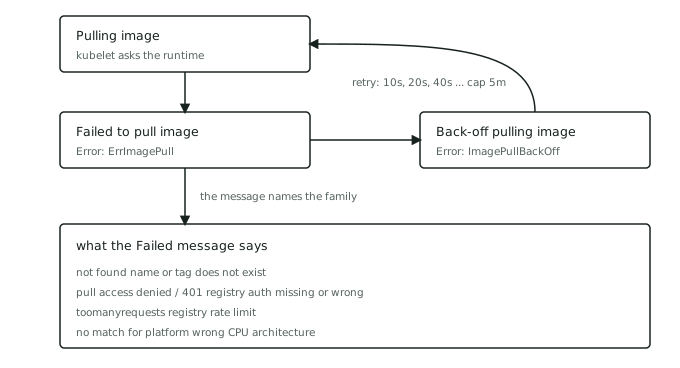
One failing pull, seen at two points in its lifecycle. Here is the complete event sequence a single bad image reference produces, in order:
Pulling image "nginx:1.27-no-such-tag"- the attempt.Failed to pull image ...- the attempt fails, and this event carries the most specific error the runtime surfaces.Error: ErrImagePull- the container is now waiting because the pull failed.Back-off pulling image "nginx:1.27-no-such-tag"- the kubelet schedules a retry.Error: ImagePullBackOff- the container is now waiting on that schedule.
Then the loop repeats from step 1, with the gap growing: roughly ten seconds, then twenty, then forty, doubling to a cap of five minutes on the kubelet defaults we tested, the same back-off shape the kubelet applies to crashing containers. We left our repro pod looping and watched it happen: five Pulling attempts over the first five and a half minutes, each gap roughly double the last. A pod that has been broken for a while therefore spends almost all of its time in ImagePullBackOff and only flickers through ErrImagePull during each attempt, which is why the two statuses take turns in kubectl get pods.
The practical consequence: ImagePullBackOff tells you nothing except that the loop exists. The diagnosis is in event number 2, the Failed to pull image line, and nowhere else.
Where is the actual error message?
Not in the logs. kubectl logs on a pod in this state returns an error instead of output, telling you the container is waiting to start. The evidence lives in events:
kubectl describe pod <pod>
Scroll to the Events table at the bottom. This is the real one from our repro, unedited:
Type     Reason     Age                From      Message
----     ------     ----               ----      -------
Normal   BackOff    25s                kubelet   Back-off pulling image "nginx:1.27-no-such-tag"
Warning  Failed     25s                kubelet   Error: ImagePullBackOff
Normal   Pulling    10s (x2 over 26s)  kubelet   Pulling image "nginx:1.27-no-such-tag"
Warning  Failed     9s (x2 over 25s)   kubelet   Failed to pull image "nginx:1.27-no-such-tag": rpc error: code = NotFound
                                                 desc = failed to pull and unpack image "docker.io/library/nginx:1.27-no-such-tag":
                                                 failed to resolve reference "docker.io/library/nginx:1.27-no-such-tag":
                                                 docker.io/library/nginx:1.27-no-such-tag: not found
Warning  Failed     9s (x2 over 25s)   kubelet   Error: ErrImagePull
The pod never ran. There are no logs, no exit code, no crash. The entire investigation is one
Failed to pull imageline inkubectl describe.
Two reading aids. The table is ordered by each event's most recent occurrence, not by logical sequence, which is why it looks shuffled against the numbered list above. And the (x2 over 26s) notation is aggregation: Kubernetes deduplicates repeating events, so a pod that has been failing all night shows a handful of lines with high counts, not thousands of lines. If the events have aged out entirely (they are only retained for an hour by default), the same message is also mirrored into the pod's status: kubectl get pod <pod> -o jsonpath='{.status.containerStatuses[0].state.waiting.message}'. One version hedge on that fallback: on recent kubelets (verified on the v1.34 cluster above) the waiting message carries the full pull error in both states - even mid-back-off it reads Back-off pulling image "...": ErrImagePull: rpc error: ... not found - while older kubelets show only the bare Back-off pulling image line during the wait, so there the events are your only copy of the verdict.
The long Failed to pull image message decomposes into the runtime's framing plus the registry's verdict at the end. That final clause is what you branch on. The common families follow.
What causes ImagePullBackOff?
We reproduced each family on a live cluster; the quoted line is what each one leaves in the events.
"not found": the image name or tag does not exist
docker.io/library/nginx:1.27-no-such-tag: not found
A typo in the tag, a tag that was never pushed, a tag your CI names differently than your manifest assumes, or a tag someone deleted. This is the boring family and the most common one. Read the reference in the event back to yourself character by character, exactly as the runtime expanded it (docker.io/library/... tells you which registry and namespace it actually asked). The fix is the reference, not the cluster. If the expanded reference checks out character for character, the next suspect is whatever sits between the node and the registry: a mirror or pull-through cache can answer not found for a tag the upstream has.
"pull access denied" or "401 Unauthorized": registry credentials
Two observed variants. Docker Hub, wrong repository name:
pull access denied, repository does not exist or may require authorization
GHCR, private image pulled with no credentials:
failed to authorize: failed to fetch anonymous token: unexpected status from GET request
to https://ghcr.io/token?scope=repository%3A...%3Apull&service=ghcr.io: 401 Unauthorized
Notice the trap in the first line: registries will not tell an anonymous caller whether a private repository exists, so a typo in the image name and missing credentials produce the same event. Rule out the typo first, then work the auth chain: does the namespace contain the pull secret (kubectl get secret <name> -n <ns>), does the pod itself carry it (kubectl get pod <pod> -o jsonpath='{.spec.imagePullSecrets}'), and is the credential inside it still valid? Check the pod, not the ServiceAccount: a ServiceAccount's pull secrets are copied into the pod spec at admission, so the pod object is authoritative, and a secret added to the ServiceAccount after the pod exists does nothing until the pod is recreated. Secrets are namespaced; the one that works in staging does nothing in prod, and tokens expire (cloud registries like ECR mint short-lived ones by design). We verified the fix end to end: the same private image that produced the 401 above went straight to Running once the pod carried an imagePullSecrets entry pointing at a valid registry secret in its own namespace.
"toomanyrequests": registry rate limits
The one family we chose not to reproduce, because doing so means hammering a public registry on purpose. The shape is the same: the pull fails, and the Failed to pull image event carries the registry's refusal, which for Docker Hub is an HTTP 429 whose body includes its documented toomanyrequests: You have reached your pull rate limit message. The distinguishing smell is that nothing changed on your side: the reference is right, the credentials are right, and it pulled fine an hour ago. Anonymous limits are counted per source IP, so a whole cluster behind one NAT gateway shares a single allowance, and a node autoscaling event or a big rollout can spend it. Authenticating the pulls raises the limit; a pull-through cache or registry mirror removes the dependency.
"no match for platform": architecture mismatch
failed to pull and unpack image "docker.io/arm64v8/alpine:3.20":
no match for platform in manifest: not found
Observed by pulling an arm64-only image onto an amd64 node. The not found suffix makes this family easy to misfile as a typo, but the reference is fine; the manifest simply offers no build for your node's CPU. The classic route here is an image built on an Apple Silicon laptop (arm64) deployed to an x86 cluster, or the reverse. Check what the image offers (docker manifest inspect <image>) against what the node is (kubectl get nodes -L kubernetes.io/arch prints each node's architecture), and fix it in the build with a multi-arch image (docker buildx build --platform linux/amd64,linux/arm64). One boundary observed the hard way elsewhere: this event only appears when the manifest is honest about its platforms. A single-platform image that slips through can pull successfully and then die at exec time instead, which moves you into crash-loop territory rather than pull territory.
One more family carries no registry verdict at all, because the request never got one: the path between the node and the registry. DNS failure (no such host), a TLS-intercepting proxy or private CA the node does not trust (x509: certificate signed by unknown authority), a broken proxy configuration, or the registry itself being down. We have not staged these, but the giveaway reads the same everywhere: the Failed to pull image message names a connection failure instead of a registry answer, which moves the investigation from the manifest to the node's network.
CrashLoopBackOff vs ImagePullBackOff: which one do you have?
The names rhyme and the back-off follows the same doubling-to-a-cap shape (two separate implementations under the hood), so the two get conflated constantly. The separator is one question: did a container ever start?
ImagePullBackOff means never - for that container. In a multi-container pod the STATUS column can broadcast one container's pull failure while its siblings run and produce logs, so check every entry in .status.containerStatuses, not just the first. Behind the failing status there is no container at all: no logs, no exit code, nothing to restart - our repro pods all showed restartCount: 0, started: false, and an empty lastState, however long we left them looping. The failure sits entirely in the pod-spec-to-registry chain (name, auth, quota, platform), and the evidence lives in kubectl describe events. It cannot be a bug in your running code, because your code never ran; the delivery chain - the manifest, what your CI actually tagged and pushed, the registry's permissions - is exactly where to look.
CrashLoopBackOff means the image arrived, a container started, and then it died, repeatedly. The evidence lives in the opposite places: lastState.terminated (the exit code and lifetime) and kubectl logs --previous. That diagnosis is two questions of its own, and if the exit code is 137, a third path again.
If you remember nothing else: pull errors leave events, crash errors leave corpses. Interrogate accordingly.
Does deleting the pod fix it?
An honest boundary, in three parts.
First, deletion. Deleting the pod (or kubectl rollout restart on the Deployment) resets the back-off, and the replacement pod pulls immediately. That is the right move exactly once: after you have fixed the cause and do not want to wait out a five-minute back-off. Done before the fix, it buys you a fresh loop with a shorter wait.
Second, the event names the family, not the member. 401 Unauthorized does not tell you which of the three links in the auth chain is broken, whether the token expired yesterday or never existed, or that the secret is sitting in the wrong namespace. The message ends the guessing about what kind of problem you have; the remaining work is ordinary troubleshooting, hypothesis by hypothesis.
Third, the exact wording travels, and so does the timing. What we quoted is containerd 2.2 on k3s talking to Docker Hub and GHCR; a different runtime version or registry words its refusals differently (manifest unknown is a common spelling of the not-found family, and each cloud registry has its own accent for a 401), the ten-seconds-to-five-minutes schedule is the kubelet default on the version we tested rather than a constant of the platform, and older kubelets keep less of the error in the pod status than ours did. The tokens vary. The structure - attempt, a failure event carrying the most specific error the runtime surfaces, back-off, the same short list of cause families - is the part that holds.
Where we fit in
ImagePullBackOff is close to a rite of passage: nearly everyone who has deployed to Kubernetes has stared at it, and it is a favourite opener in live debugging interviews precisely because it separates people who read evidence from people who recite causes. The habit this post teaches is transferable and cheap to practise: break a manifest on purpose in a disposable cluster, then diagnose it from the events alone, without peeking at what you broke.
What a solo laptop session cannot do is show anyone else that you can do this cold. On SkillBricks, the same diagnosis performed in a live environment, under observation and a clock, becomes a verified brick on your wall: proof of the process, not a claim about it. If you just read the four event lines above and knew the family before the explanation, that is exactly the skill worth proving.